

Welcome to your complete guide on what was once called Google Webmaster Tools, now known as Google Search Console. Think of it as the control panel for your website's health and performance on Google Search. For any business in Brisbane, Noosa, or anywhere on the Sunshine Coast, getting a handle on this free tool is non-negotiable for online success.
Your Website's Direct Line to Google
Imagine trying to navigate the beautiful Sunshine Coast without a map or GPS. You’d probably find your way eventually, but you'd waste a lot of time and miss all the best spots. Running a website without Google Search Console is a lot like that.
It provides a direct line of communication between your website and Google, offering invaluable data on how the search engine actually sees, crawls, and ranks your pages. It’s the tool that demystifies the often-confusing world of SEO, swapping guesswork for hard data.
As an award-winning web design agency with deep SEO marketing skills, we see it as the single most important tool for any local business aiming to thrive online. Period.
Why It's a Game-Changer for Local Businesses
For a business targeting customers in Noosa, Brisbane, or the surrounding areas, visibility is everything. Google Search Console is critical because it helps you understand and improve that visibility right where it matters most. It's how you monitor your site’s health, diagnose technical issues, and ultimately, attract more local customers who are actively searching for your services.
The platform is especially vital here in Australia, where Google commands roughly 93% of the search engine market share. Since almost every online journey starts with a search, being seen is paramount. You can get more insights on the state of Australian search marketing on searchscope.com.au.
Think of Google Search Console as a doctor for your website. It runs diagnostics, flags potential problems, and gives you a detailed health report, ensuring your site is in peak condition to perform in search results.
To give you a clearer picture, here’s a quick breakdown of what Search Console does and why it matters for a local business like yours.
Google Webmaster Tools (Search Console) at a Glance
| Core Function | Benefit for Your Brisbane Business |
|---|---|
| Performance Monitoring | See exactly what people are searching for to find you and which pages are getting the most clicks. |
| Index Coverage Reporting | Check that Google can find and list all your important pages, and fix any that are missing. |
| URL Inspection | Get a detailed analysis of a specific page to see how Google views it and troubleshoot issues. |
| Mobile Usability Checks | Receive alerts if your site isn’t working properly on mobile phones, protecting your rankings. |
| Security Alerts | Get notified immediately if your site is hacked or has security issues that could harm visitors. |
Mastering the reports in Search Console gives you a serious competitive advantage. It's the key to making smarter decisions about your online strategy.
Moving from 'What' to 'Why'
Understanding what this tool is marks the first step. The real power comes from understanding why each piece of data matters. By getting comfortable with this platform, you gain a massive edge. It allows you to:
- See Your Performance: Discover which search queries are bringing people to your website.
- Ensure Visibility: Confirm that Google can find and crawl all your important pages.
- Fix Critical Issues: Receive alerts for problems like mobile usability errors or security threats.
- Optimise Your Content: Analyse click-through rates to improve your page titles and descriptions.
Getting Your Website Set Up and Verified
Before you can tap into all the incredible data inside what used to be called Google Webmaster Tools, you’ve got to prove to Google that you actually own your website. Think of it like getting the keys to your new business premises on the Sunshine Coast; you can’t see what’s going on inside until you prove you have the right to enter.
This verification process is the critical first step. It’s what officially connects your site to Google Search Console and gets all that juicy performance data flowing. It might sound a bit technical, but it’s a straightforward task that any business owner in Brisbane or Noosa can handle.
The goal is simple: confirm you’re the owner so Google knows it’s giving sensitive website data to the right person. As an award-winning web design agency, we walk our clients through this every day, making sure they’re connected quickly and without any fuss.
Choosing Your Verification Method
Google gives you a few different ways to verify your site, each suited to different levels of technical comfort. You only need to pick one. It’s a bit like proving your identity; you can use a driver’s licence, a passport, or another official document—they all get the job done.
Here’s a quick look at the most common options:
- HTML Tag: This involves adding a small piece of code (called a meta tag) into the
<head>section of your website’s homepage. It’s like adding a small, official plaque to your front door that only Google can read. - HTML File Upload: With this method, you upload a specific HTML file from Google straight into the root directory of your website. This is similar to placing a unique, coded document inside your business’s main filing cabinet for Google to find.
- Domain Name Provider: This is often the easiest path. You verify ownership through your domain registrar (the company where you bought your domain name). This works by linking your Search Console account directly to your domain, acting as a digital handshake between Google and your provider.
This screenshot from Google shows the very first screen you'll see, where you begin the process of adding your website as a 'property' in Search Console.
This welcome page is your gateway to understanding exactly how Google sees your site. It’s the starting line for optimising your entire online presence.
Keeping the Process Simple
Which method should you choose? It really depends on your access and comfort level. If you're on a platform like WordPress, there are plugins that make the HTML tag method incredibly easy. If you’re comfortable poking around in your hosting provider’s file manager, the HTML file upload is a solid choice.
But for most business owners, the Domain Name Provider method is the most direct and recommended option.
Don't let the technical terms throw you off. Verification is a one-time setup that unlocks a continuous stream of priceless insights. The five minutes it takes to do this will pay you back for years to come.
Once you’re verified, that’s it—you’re in. Your website is officially connected, and Google Search Console will start collecting data. Before you know it, you'll have access to reports that show you precisely how your Noosa eCommerce store or Brisbane service business is performing in search results.
Navigating The Key Reports In Search Console
Once your website is verified, logging into Google Search Console for the first time can feel like sitting in the cockpit of a jet. There are dials, graphs, and data points everywhere. But just like a pilot's dashboard, every single report has a crucial job: to tell you exactly how your website is performing and what it needs to fly higher.
As a Sunshine Coast-based agency, our web design and SEO marketing expertise means we can turn this raw data into a clear roadmap for growth. This section is your guided tour through the most important reports, where we’ll translate confusing metrics into smart, actionable steps for your business.
The Performance Report: Your Customer Compass
The Performance Report is easily the most exciting part of Google Search Console. It’s where you see the exact search terms people are typing into Google to find you. Think of it as a direct line into your customers' minds.
This report is a treasure map for understanding what your Brisbane and Noosa audience really wants. It answers the most important questions:
- Queries: What actual keywords are people using to find you?
- Impressions: How many times did your site appear in search results for those keywords?
- Clicks: How many people actually clicked on your site from those results?
- Click-Through Rate (CTR): What percentage of people who saw your site decided to click?
Imagine a Noosa eCommerce store sees they're getting tons of impressions for "eco-friendly beach towels Sunshine Coast" but a really low CTR. That’s a huge clue. It tells them their title tag or meta description isn't compelling enough. By changing it to something like "Award-Winning Eco Beach Towels | Free Noosa Delivery," they can speak directly to the searcher's needs and drive way more clicks.
Beyond just seeing what queries bring you traffic, this report is the foundation for understanding your site's true visibility and learning how to check keyword rankings effectively.
The Index Coverage Report: Ensuring Your Pages Are Seen
The Index Coverage Report is your website’s roll call with Google. Its job is simple but absolutely vital: it tells you which of your pages Google has successfully found, crawled, and added to its massive library (its index). If a page isn't in the index, it simply can't show up in search results. Period.
This report breaks your pages down into four main statuses:
- Error: Pages that couldn't be indexed because of a critical problem.
- Valid with warnings: Pages that are indexed but have an issue you should look into.
- Valid: Pages that have been successfully indexed. No problems here.
- Excluded: Pages that were intentionally—or sometimes unintentionally—left out of the index.
For a Brisbane plumber, finding their main "Commercial Plumbing Services" page under 'Error' is a red-alert situation. This report lets them spot that problem instantly, fix it, and tell Google to try again, making sure potential clients can actually find their most valuable service.
The infographic below shows the simple verification process, which is your first step to unlocking all these powerful reports.
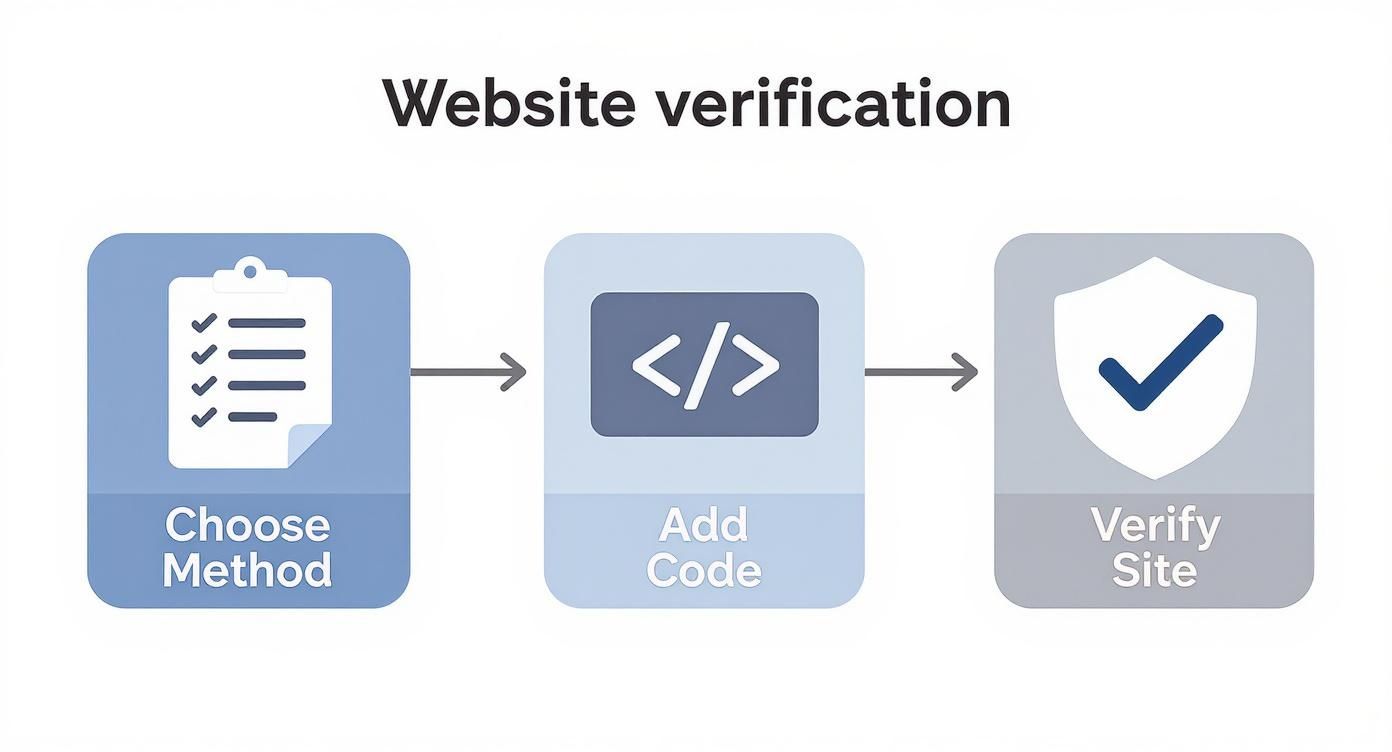
This simple three-step flow—choosing a method, adding a snippet of code, and clicking 'verify'—is your key to accessing all the powerful data we're talking about.
The URL Inspection Tool: A Page-Level Deep Dive
If the Index Coverage report is a roll call for your whole site, the URL Inspection Tool is like a one-on-one interview with a specific page. Just paste in any URL from your website, and you'll get a detailed diagnostic report straight from Google's index.
It tells you if the page is indexed, whether it’s mobile-friendly, and if there are any technical gremlins holding it back. It’s the ultimate troubleshooting tool for figuring out why a single, important page isn't ranking the way you think it should.
Think of the URL Inspection Tool as your personal SEO detective. When a page is underperforming, this tool gives you the clues you need to solve the mystery and get it back on track.
Sitemaps, Mobile Usability, And Your Overall Health
To round things out, a couple of other reports are essential for keeping your site in good shape with Google.
The Sitemaps report is where you hand Google the blueprint to your website. A sitemap is a simple file listing all your important pages, making it much easier for Google to discover your content efficiently—especially if your site is brand new or has hundreds of pages.
And in today's world, the Mobile Usability report is non-negotiable. It flags any issues that make your site a pain to use on a smartphone, like text being too small or buttons being too close together. With so many customers on the Sunshine Coast searching on their phones, a clunky mobile experience will send them straight to your competitors.
Here's a quick rundown of the most valuable reports and how they help you.
Key Search Console Reports and Their Purpose
| Report Name | What It Tells You | Why It Matters for Local SEO |
|---|---|---|
| Performance | Which keywords bring you traffic, clicks, and impressions. | Shows what local search terms are working (e.g., "plumber Noosa") so you can double down. |
| Index Coverage | Which of your pages are successfully in Google's index. | Confirms your key service and location pages are visible to local customers. |
| URL Inspection | A detailed technical health check for a single page. | Lets you troubleshoot why a specific service page isn't ranking in your target suburb. |
| Sitemaps | If Google can find and read your list of important pages. | Ensures Google knows about all your pages, especially new blog posts or service areas. |
| Mobile Usability | If your site works properly on smartphones and tablets. | Critical for capturing on-the-go customers searching for services "near me." |
| Security Issues | Any signs that your site has been hacked or contains malware. | Protects your reputation and prevents Google from flagging your site as unsafe. |
These reports work together to give you a complete, 360-degree view of your website's relationship with Google. Keeping an eye on them is the first step to making smarter, data-driven decisions that actually grow your business.
Putting Your Data into Action for Local SEO Success
Having access to the data inside what used to be Google Webmaster Tools is one thing; knowing what to do with it is where the real magic happens. For a business on the Sunshine Coast or in Brisbane, this data is your roadmap to outsmarting the competition. It’s about turning those graphs and numbers into tangible strategies that get more local customers through your door.
As an award-winning web design agency, we don’t just look at data—we translate it into growth. Let's move beyond the reports and get our hands dirty with practical actions you can take based on what Google Search Console is telling you.
Turning High Impressions into Local Customers
One of the most common situations we see is a business in Noosa or Brisbane with a key service page that has heaps of impressions but a really low click-through rate (CTR). This means your page is showing up in search results, but people just aren't clicking. It’s a massive missed opportunity.
Think of it like having a beautiful shopfront on a busy street, but nobody ever comes inside. The problem isn't your location (your ranking); it's your window display (your search snippet).
Here’s how to fix it:
- Analyse the Search Snippet: Jump on Google and search for the keyword yourself. Look at your page title and meta description. Is it compelling? Does it speak directly to what a local customer needs right now?
- Optimise Your Page Title: Your title is the most important part of your snippet. Instead of a generic "Plumbing Services," try something specific and benefit-driven like "Emergency Plumber Brisbane | 24/7 Service & No Call-Out Fee." This immediately answers key questions and builds trust.
- Rewrite Your Meta Description: This is your 160-character sales pitch. Don't just list what you do. Use it to highlight what makes you different. For example: "Your trusted, award-winning Sunshine Coast electricians. We guarantee on-time service for all residential and commercial jobs. Get a free quote today!"
These small changes can dramatically lift your CTR, turning those impressions into actual website visits from qualified local leads.
Diagnosing and Fixing Mobile Usability Errors
The Mobile Usability report in Google Search Console is your early warning system for a problem that could be costing you dearly. If you get an alert for "Text too small to read" or "Clickable elements too close together," you need to act fast.
For a customer searching for "cafes near me" in Noosa on their phone, a frustrating mobile experience is an instant dealbreaker. They won't squint to read your menu; they'll simply hit the back button and go straight to your competitor.
Think of mobile usability errors as a broken front door on your digital storefront. It doesn't matter how great your products or services are inside if customers can't get in comfortably.
Fixing these issues often requires tweaks to your website's design. This is where partnering with a professional web design agency makes a huge difference. As a design-first agency, we build award-winning websites that are responsive and give a seamless experience on any device, protecting your rankings and your revenue.
Uncovering New Content Opportunities
The Performance report isn't just for checking your current rankings; it's a goldmine for discovering what your audience wants next. Filter your queries to find the questions people are actually asking. You might see searches like "best dog friendly beaches sunshine coast" or "how to prepare a deck for storm season brisbane."
These are not just keywords; they are content ideas handed to you on a silver platter.
- Create Helpful Blog Posts: Write an article answering these specific questions. A post titled "Our Top 5 Dog-Friendly Beaches on the Sunshine Coast" is incredibly valuable for locals and tourists alike.
- Develop Service Page FAQs: Add a Frequently Asked Questions section to your service pages that addresses these queries directly.
By creating content that answers real-world questions from your target audience, you establish your business as a helpful local authority. This builds trust and attracts highly qualified traffic for the long haul. If you want to dive deeper, our detailed guide to local SEO strategies can provide even more powerful ideas.
This proactive approach is crucial, especially when you look at the local search landscape. In Australia, a huge 46% of all Google searches include local intent, and the top-ranking local businesses capture nearly a quarter of all clicks. Acting on your Google Search Console data is how you grab your share of that market.
Troubleshooting Common Website Issues
Think of Google Search Console as your website's dedicated early warning system. Long before a customer on the Sunshine Coast notices a problem—or worse, gets a scary security warning when trying to visit your site—this tool will send up a flare. It alerts you to critical issues that can tank your rankings and erode trust with your customers.

This part of the guide is all about helping you handle these alerts calmly and effectively. We’ll break down the most common technical SEO problems flagged by what was once called Google Webmaster Tools and show you how to start fixing them, ensuring your online presence in Brisbane and beyond stays strong and reliable.
Decoding Security Issues And Manual Actions
Getting an email from Google about a "Security Issue" or "Manual Action" can definitely make your heart skip a beat, but it's vital not to panic. These are the most serious alerts Search Console will send, and they need your immediate attention.
A Security Issues report means Google has detected that your site might be hacked or contains malware. This could be anything from dodgy code to deceptive pages. It’s like finding out the front door to your Noosa shop has been tampered with; you need to secure it immediately to protect your customers and your reputation.
A Manual Action is different. This is a penalty handed out by a human reviewer at Google when they decide your site is breaking their guidelines. This can happen for things like having thin, low-quality content or using shady SEO tactics. A manual action can lead to your pages being demoted or even removed from search results entirely.
"Receiving a manual action is like getting a direct message from Google telling you to fix a specific problem. While it's serious, it's also a clear instruction. Addressing the issue and submitting a 'reconsideration request' is the path back to good standing."
The first step for either of these is to follow the instructions in the report to the letter. For security problems, this usually involves cleaning your site and server. For manual actions, you must fix the violation before you can ask Google to review your site again.
Tackling Common Indexing Problems
Not all issues are as full-on as a security breach. More often, you’ll be dealing with indexing problems that pop up in the Coverage report. These are technical hiccups that stop Google from properly finding and listing your pages.
Think of it this way: if your new service page for the Brisbane market isn't indexed, it’s invisible. No one searching on Google will ever find it. This is why keeping a close eye on your index coverage is so important for your bottom line.
Here are a few common indexing errors and what they actually mean:
- Server error (5xx): Your server didn't respond when Google tried to crawl the page. This could be a temporary glitch or a sign of a bigger hosting issue.
- Redirect error: A redirect you've set up for a page isn't working right, sending Googlebot into an endless loop.
- Submitted URL blocked by robots.txt: You’ve accidentally told Google not to crawl a page that you’ve included in your sitemap. It's a classic case of mixed signals.
- Crawled – currently not indexed: Google has seen the page but decided not to add it to its index. This often happens when it thinks the content is low-value or a duplicate of another page.
To get on the front foot and resolve problems using the data from Google Search Console, knowing how to audit a website for peak performance is absolutely crucial. A regular audit helps you catch these issues before they start hurting your traffic. On top of that, site speed plays a huge role in both indexing and user experience; our WP Rocket review explores a powerful tool for making your site much faster.
As an award-winning web design agency, we help businesses across the Sunshine Coast diagnose and fix these technical issues, making sure every important page is visible and ready to attract new customers.
Working with a Web Design Agency
Google Search Console is an absolutely brilliant DIY tool, no doubt about it. But let’s be honest—staring at all that raw data and figuring out how to turn it into a winning strategy can feel overwhelming. This is where a great web design and SEO agency becomes your secret weapon, especially in competitive local markets like the Sunshine Coast, Brisbane, and Noosa.
We don’t just read the reports. As a web design first agency with strong SEO marketing skills, we use them as the blueprint for a complete digital growth plan.
Think of the data in Search Console like a basket of high-quality, fresh ingredients. You could probably whip up a decent meal. But a professional chef can take those same ingredients and create something truly special. We’re your digital chefs, turning raw data into real, measurable success.
From Data to Design and Strategy
As a design-first agency, the goldmine of information in Google Search Console directly shapes how we build and fine-tune websites. For instance, if the Mobile Usability report starts flagging errors, that’s a massive red flag. It tells us the design needs immediate attention before you start losing customers who are browsing on their phones.
Or maybe the Performance report shows that a crucial service page has a dismal click-through rate. We’ll take that data and use it to rework page titles and on-page elements, making them far more compelling to a real person. This data-driven approach means every decision we make—from user experience tweaks to technical fixes—is based on actual user behaviour, not just guesswork.
We weave Google Search Console data into the very fabric of our design and development process. For us, it’s not just an SEO tool; it’s a strategic guide that ensures the award-winning websites we build are engineered to perform from day one.
Nailing the Advanced Technical SEO
Beyond the design, we use Search Console to dive deep into the kind of advanced technical SEO that’s crucial for ranking well. This is where the real magic happens.
This includes:
- Analysing Crawl Stats: We get right under the hood to see how Googlebot is interacting with your site, spotting any inefficiencies that might be wasting your "crawl budget."
- Fixing Indexing Errors: We systematically hunt down and resolve complex coverage issues to make sure every single one of your critical pages is visible to Google.
- Monitoring Core Web Vitals: We use the data to pinpoint and fix issues with page speed and user experience metrics, which are now huge ranking factors.
Partnering with an expert team means you have pros who can navigate the technical maze of SEO and turn raw data into a clear roadmap for growth. It’s the difference between owning a powerful tool and knowing exactly how to use it to get ahead in the competitive Sunshine Coast market.
Your Questions Answered
When you’re diving into a powerful platform like Google Search Console, it’s completely normal to have a few questions. As a local agency that works with businesses right across the Sunshine Coast, Noosa, and Brisbane, we hear a few of the same queries pop up time and time again.
We’ve put together some clear, straight-up answers to help you get the most out of what used to be called Google Webmaster Tools.
Is Google Webmaster Tools The Same As Google Search Console?
Yes, they're the exact same thing. Google officially changed the name from 'Google Webmaster Tools' to 'Google Search Console' way back in 2015.
The name change was a smart move because it reflects who actually uses the platform now. It’s not just for technical 'webmasters' anymore; it's a must-have tool for marketers, SEO specialists, business owners, and developers. So, if you hear someone mention Google Webmaster Tools, they’re just using the old name for the current Google Search Console.
Can Google Search Console Improve My Rankings Directly?
No, simply using Search Console won’t magically boost your rankings. It's much better to think of it as your website's diagnostic tool—like the dashboard in your car. It won’t fix the engine for you, but it flashes the warning lights and gives you the data to show you exactly what needs attention.
Search Console gives you the critical insights needed to make smarter decisions about your content, technical SEO, and overall marketing strategy. It’s by acting on these insights—fixing errors, optimising pages for higher click-through rates, and improving mobile usability—that you can significantly enhance your website's performance and, as a result, your rankings.
How Often Should I Check My Google Search Console Account?
For most small and medium-sized businesses in places like Noosa or Brisbane, popping into your Google Search Console account once a week or every fortnight is a great rhythm to get into. This routine lets you keep an eye on performance trends and catch any new errors before they become big problems.
It's also a good habit to log in after you've made significant changes to your website, like launching a new section or rolling out a redesign, just to make sure Google is indexing everything correctly. And don’t stress—Google will email you alerts for any major issues, like security problems or manual actions, so you don't need to be glued to the screen 24/7.
Ready to turn the insights from Google Search Console into measurable growth for your Sunshine Coast or Brisbane business? At Digital Roo's, our award-winning team blends expert web design with data-driven SEO to build websites that don't just look great—they perform. Let's build a stronger online presence together. Find out more at https://digitalroos.com.

