

A canonical URL is your way of telling search engines which version of a webpage is the official, or ‘master’, copy. Think of it as the one true URL you want showing up in search results, especially when you have multiple pages with identical or very similar content.
The Role of a Canonical URL in SEO

Imagine your website is a library. You might have several copies of the same book—a hardcover, a paperback, and a digital version. While they all tell the same story, the library needs a master record to point to the definitive edition. A canonical URL does exactly that for your website.
It’s a quiet little signal in your site's code, using what’s called a rel="canonical" tag. It essentially tells search engines like Google: "Out of all these similar-looking pages, this is the one you should pay attention to." This simple instruction is vital for solving the persistent SEO headache of duplicate content.
What Is Duplicate Content
Duplicate content pops up whenever the same, or almost the same, information appears on more than one URL. It happens all the time, often without you even realising it.
Here are a few classic examples:
- E-commerce product filters: A URL for a t-shirt might change if you filter by colour or size (
.../shirt?colour=bluevs..../shirt?size=M). - Tracking parameters: URLs often get extra bits added for marketing campaigns (
.../page?utm_source=newsletter). - Printer-friendly versions: Some sites create a separate, stripped-down version of a page just for printing.
Without a canonical URL to guide them, search engines see these as completely separate pages and get confused. They don't know which one to rank, which ends up diluting your SEO power by splitting your ranking signals across multiple URLs.
The Origin of the Canonical Tag
Canonical URLs were rolled out as a technical solution to this duplicate content problem, which really blew up with the rise of dynamic websites. Here in Australia, the use of canonical tags became widespread after Google officially announced support way back in 2009.
To really get your head around this, it helps to first understand the principles of an optimal URL structure. Local agencies quickly found that getting canonicals right could improve how efficiently Google crawls a site by 30-40%—a massive deal for larger websites. You can learn more about how canonical URLs became a cornerstone of technical SEO by exploring detailed guides on website canonicalisation.
Why Proper Canonicalization Drives SEO Success
So, we've covered the basics, but let's get into why a canonical URL is so much more than just a bit of technical housekeeping. Getting this right is what directly fuels your SEO performance.
Imagine you have multiple URLs all leading to the same piece of content. When this happens, all your hard-earned ranking signals—things like backlinks and user engagement—get split between them. It’s like trying to fill a bucket with water from several leaky hoses; you end up losing most of the pressure and a lot of water.
Canonicalization is the fix. It acts like a funnel, gathering all that scattered ranking power from the duplicate pages and directing it squarely at a single, authoritative URL. This consolidated strength, what we often call 'link equity', tells search engines like Google that your preferred page is the real deal. Suddenly, one page gets all the credit instead of five different pages getting a little bit each.
Optimising Your Crawl Budget
Another huge win here is how it helps you manage your crawl budget. Search engine bots don't have unlimited time to spend on your site. If they’re wasting their resources crawling ten slightly different versions of the same product page, they might never get around to indexing your important new blog post or that brand-new service page you just launched.
This is where a canonical tag becomes a game-changer. By clearly telling the bots, "Hey, ignore these copies and focus on this master version," you guide them to spend their time on unique, valuable content. They stop wasting resources on duplicate URLs, which means your most critical pages get discovered and indexed much faster. This efficiency is especially vital for big e-commerce sites or publishers juggling thousands of pages. You can also give your crawl budget a hand by boosting site speed, something we cover in our WP Rocket review and setup guide.
Boosting Ranking Signals and Authority
At the end of the day, proper canonicalization is all about clarity and consolidation. It tidies up your site architecture from a search engine’s perspective, preventing any confusion and making sure your best content gets the full SEO credit it deserves. Recent Australian digital marketing stats really drive this point home.
In 2023, 65% of SEO professionals ranked canonical URLs among the top three technical practices for improving website ranking and traffic. The absence of these tags was linked to duplicate content issues on approximately 22% of mid-sized Australian websites, often causing organic traffic to drop by up to 15%. Without canonicalization, the value from backlinks can fragment across multiple URLs, diluting your site's overall authority. You can discover more insights about these findings on Traffic Radius.
By putting canonicals in place correctly, you’re not just tidying up your URLs. You're building a much stronger foundation for all your SEO efforts, which leads to better rankings and more consistent organic traffic down the line.
How to Implement Canonical URLs the Right Way
Putting canonical URLs into practice is way easier than it sounds. For most websites, it all comes down to adding a single, simple line of code to your page's HTML. This little instruction tells search engines exactly which URL to prioritise, making sure all your SEO efforts are pulling in the same direction.
The most common and straightforward method by far is using the rel="canonical" link tag. This small piece of HTML gets placed inside the <head> section of any duplicate page. Think of it as a clear signpost, pointing Google directly to the master version of the page you want to rank.
Using the rel="canonical" Link Tag
Imagine you have a product page that can be reached via two different URLs. One is the clean, main URL, and the other has tracking parameters tacked on for a marketing campaign. On the page with the tracking parameters, you would add this bit of code to its <head> section:
This tag is basically telling search engines, "Hey, even though this page's URL looks different, the real content lives over at the href link. Please send all the ranking power to that URL." It’s a simple step that consolidates your link equity and keeps your analytics clean.
For websites built on platforms like WordPress, a lot of the popular SEO plugins handle this for you automatically. This is especially true if you’re using a quality provider for your WordPress hosting in Australia.
This infographic gives a great visual of how a canonical tag funnels all that scattered ranking power into one stronger page.
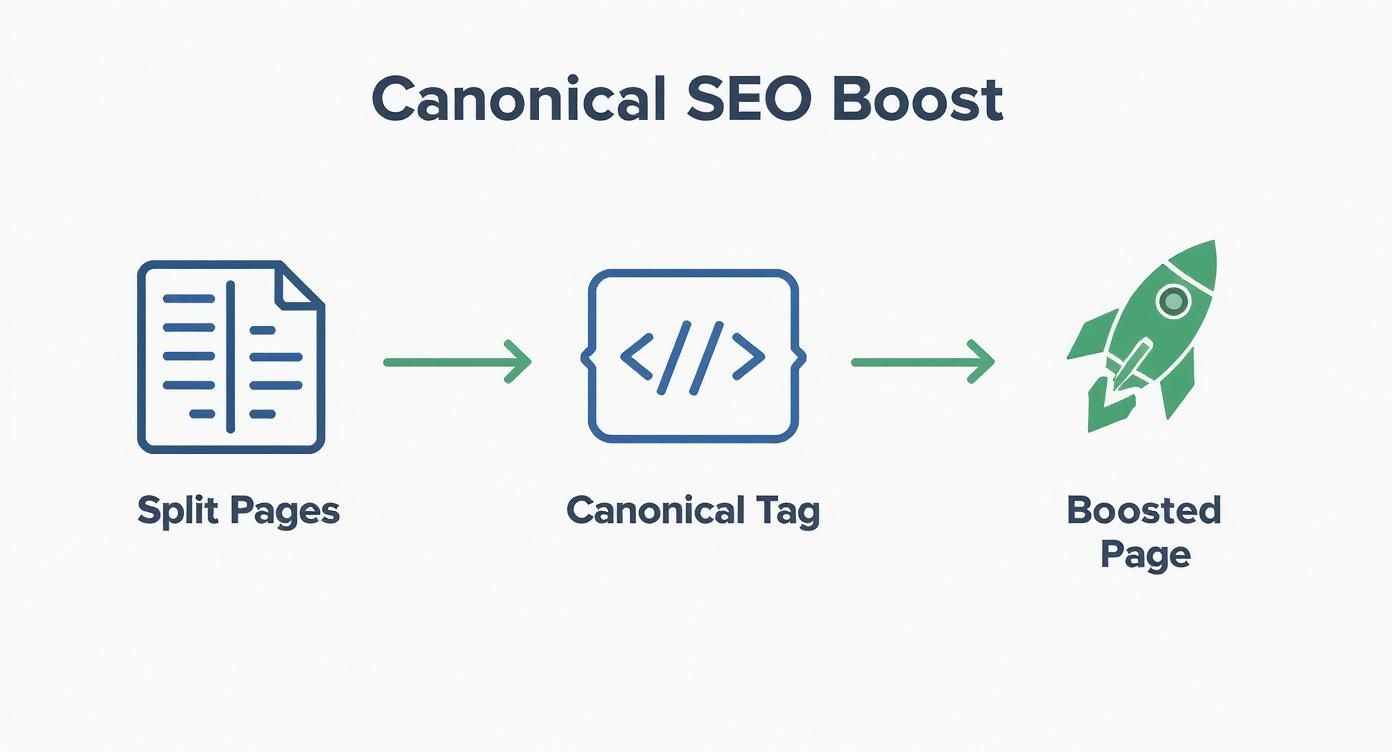
As you can see, it directs all the authority from multiple duplicate URLs back to a single, preferred page, giving it a much better shot at ranking well.
The Power of Self-Referencing Canonicals
One of the most important best practices is to use a self-referencing canonical. All this means is that a page’s canonical tag points to its very own URL. So, for the page at https://www.yourwebsite.com.au/product-page/, the code would look like this:
It might seem a bit redundant, but this is a brilliant defensive move. It stops potential issues from rogue URL parameters or other dynamic factors that might create duplicate versions of your page without you ever knowing. A self-referencing canonical makes it crystal clear that this page is the one and only original version.
Choosing Your Canonical Implementation Method
While the HTML tag is the go-to for most web pages, it’s not the only tool in the box. Different situations call for different methods to tell search engines which URL is the master copy.
Here’s a quick breakdown of the main ways to set a canonical URL, what they’re best for, and how they’re implemented.
| Method | Best For | Implementation Detail |
|---|---|---|
rel="canonical" Tag |
All HTML pages. This is the most common and widely supported method. | Add a <link> tag within the <head> section of the duplicate page, pointing to the canonical URL. |
| HTTP Header | Non-HTML files like PDFs, Word documents, or image files. | Add a Link: HTTP header in your server response, specifying the canonical URL for the file. |
| XML Sitemap | Indicating preferred URLs across your entire site at a high level. | Only include your canonical URLs in your sitemap. This is a strong hint, but not a hard rule. |
For e-commerce sites juggling complex product feeds, getting a handle on the best practices for avoiding product feed duplication is absolutely essential for clean, effective SEO.
Ultimately, picking the right implementation method just ensures you’re communicating your preferences to search engines clearly, no matter what type of content you’re working with.
Canonical URLs Versus 301 Redirects
It's a common sticking point, but getting your head around the difference between a canonical tag and a 301 redirect is crucial for good SEO. They both deal with URLs, sure, but they tell search engines completely different things. Pick the wrong one, and you could be sending some seriously mixed signals that mess with your rankings.
Let’s break it down with an analogy.
A 301 redirect is like lodging a permanent change of address with the post office. You’re moving house, and you want everything—parcels, letters, junk mail (users and search engine bots)—forwarded from your old address to your new one. The old address is officially out of action.
A canonical URL, on the other hand, is more like a preferred nickname. It’s like saying, "You can find me at Robert's house, Bob's place, or Rob's flat, but my official address is Robert's house." All versions of the page are still live and accessible, but you’re telling search engines to send all the mail—the authority and ranking signals—to the main 'Robert's house' version.
When to Use a Canonical Tag
A canonical tag is your best mate when you've got duplicate or very similar content that you need to keep live for users. It’s a quiet signal to search engines, pointing them to the master copy without actually forcing the user anywhere.
You'll want to use a canonical tag in situations like these:
- E-commerce Product Pages: Think of a t-shirt that comes in different colours. Each colour might create a unique URL (
/shirt?colour=blue), but they're all the same core product. These variations should all point their canonical tag to the main product page (/shirt). - Tracking and Session IDs: Marketing campaigns often tack parameters onto URLs (
?utm_source=facebook). These create duplicate pages that should always canonicalise back to the clean, original URL. - Syndicated Content: If you let another website republish your blog post, their version should have a canonical tag pointing right back to your original article, giving you the credit.
When to Use a 301 Redirect
A 301 redirect is a much stronger, permanent command. It’s the right tool for the job when a page is gone for good, and you want to make absolutely sure that both users and search engines are sent to its new home.
A 301 redirect passes between 90-99% of link equity (or "link juice") to the new page. It's the most powerful signal you can send that a page has permanently moved, making it essential for protecting your SEO value during any site changes.
Reach for a 301 redirect in these scenarios:
- Migrating to a New Domain: When you're moving your entire website from
oldsite.com.autonewsite.com.au. - Changing URL Structures: If you're tidying up your site's URLs, maybe changing
/blog/2024/my-postto just/blog/my-post. - Consolidating HTTP and HTTPS: To make sure all traffic trying to access the insecure
http://version of your site is automatically sent to the securehttps://version. - Merging Two Pieces of Content: If you've got two similar blog posts and decide to combine them into one monster guide, you should 301 redirect the old, weaker posts to the new, definitive one.
When it comes down to it, the choice is pretty simple. If the page is gone forever, use a 301. If you have multiple live versions of a page, use a canonical tag.
Common Canonical Mistakes That Hurt Your SEO
Even a tiny slip-up with your canonical tags can create some serious SEO headaches. The concept itself is pretty straightforward, but getting the execution right can be surprisingly tricky. Let's walk through the most common mistakes that quietly chip away at your search engine performance.
One of the most damaging (and common) errors is pointing a canonical tag to a URL that’s broken. This includes pages that spit back a 404 "Not Found" error or even a 301 redirect. Think of it like giving someone a forwarding address that leads to an abandoned building—it sends search engines on a completely useless journey and makes the tag worthless.
The fix is simple but absolutely vital: always double-check that your canonical URL is a live, indexable page with a 200 OK status. This ensures search bots can actually find and credit the master page you want them to.
Confusing Canonical Chains and Loops
Another classic pitfall is creating a "canonical chain." This is what happens when Page A has a canonical pointing to Page B, but then Page B has one pointing to Page C. This convoluted path just confuses search engines and seriously waters down the signal.
Even worse is a canonical loop, where Page A points to Page B, and Page B points right back to Page A. This creates an infinite loop that search engines will quickly give up on, leaving them to make their own (often wrong) decision about which page to rank.
Key Takeaway: Your canonical signals need to be direct and decisive. Always point a duplicate page straight to the final, authoritative version you want indexed. Never make search engines follow a messy chain of commands.
Sending Mixed Signals to Search Engines
Sending contradictory instructions is a surefire way to get your canonical tags ignored. Search engines need clear, consistent signals to make sense of your site's structure.
Here are the most common mixed signals you need to avoid:
- Canonicalising a Blocked Page: Never set a canonical tag on a page that is blocked from indexing by your
robots.txtfile or a "noindex" tag. You're basically telling search engines "this page is the master copy" and "don't look at this page" at the same time. - Tag in the Wrong Place: The
rel="canonical"tag must be placed within the<head>section of your HTML. If you stick it in the<body>, search engines will just ignore it completely. - Multiple Canonical Tags: A page should only ever have one canonical tag. If you have more than one, you create ambiguity, and Google will likely disregard them all.
While search engines don't really hand out harsh penalties for duplicate content anymore, getting your canonicalisation right is essential for preventing your rankings from being split and preserving your website's authority. Good implementation also improves the user experience by sending visitors to the right page, which helps reduce bounce rates. For Australian e-commerce sites, this is particularly important, as bounce rates can average a whopping 48%. To get a handle on how this all fits into modern SEO, you can explore detailed insights on canonicalization in 2025.
How to Audit and Test Your Canonical URLs
So, you’ve put your canonical tags in place. That’s a great first step, but how do you actually know if they're working? Slapping on a tag and hoping for the best is a recipe for trouble. You need to regularly audit and test your canonical URLs to make sure search engines are getting the right signals.
Your best starting point is Google's own toolkit. The URL Inspection tool inside Google Search Console gives you the definitive answer, straight from the source. Just pop in any URL from your site, and the report will show you exactly what Google sees, including the "Google-declared canonical" URL. This tells you in plain English whether Google is respecting your tag or has decided to choose a different page on its own.
Performing a Site-Wide Audit
Checking pages one by one is fine for a spot-check, but you really need a site-wide audit to catch problems at scale. This is where SEO crawler tools become your best friend.
Using a crawler like Screaming Frog or the Ahrefs Site Audit, you can scan your entire website and quickly pinpoint common canonicalisation issues. These powerful tools act like a fine-toothed comb, flagging critical problems that are easy to miss, such as:
- Missing Canonical Tags: Pages that look like duplicates but have no canonical tag at all, leaving Google to guess.
- Incorrect Canonical Pointers: Pages pointing to a 404 error page, a redirect, or a non-indexable page.
- Canonical Chains: Confusing loops where one page canonicalises to another, which then points somewhere else entirely.
By running regular audits, you can find and squash these issues before they start hurting your rankings. A healthy canonical strategy isn't a "set and forget" task; it needs ongoing attention to keep your site structure clean and efficient for search engines.
For businesses on the Sunshine Coast, getting your technical SEO right is a huge part of standing out in a competitive local market. If you need an expert eye to run a comprehensive site audit, exploring professional SEO services in Sunshine Coast and Noosa can give you the specialised support needed to keep your website in top shape.
Got More Questions About Canonical URLs?
Alright, let's dig into some of the common head-scratchers that pop up when people start working with canonicals. Think of this as the FAQ section where we tackle those specific scenarios that can cause a bit of confusion.
A big one we hear a lot is whether you can point a canonical tag to a completely different website. The answer is a definite yes. This is called a cross-domain canonical, and it’s an absolute lifesaver for anyone syndicating content. If you let another site republish your blog post, their version should have a canonical tag pointing straight back to your original article. This ensures all the SEO goodness flows back to you, the original creator.
Absolute vs. Relative URLs: Why One is a Must
Another critical point that often trips people up is the difference between using a relative or an absolute URL in your canonical tag.
- A relative URL looks like this:
/blog/my-post/(It leaves off the domain part). - An absolute URL is the full address:
https://www.yourwebsite.com.au/blog/my-post/
While a relative URL might seem like a handy shortcut, it can create ambiguity for search engine bots, which is the last thing you want. It's a classic case of being penny-wise and pound-foolish. Always, always use absolute URLs in your rel="canonical" tags. It’s a non-negotiable best practice that removes any chance of misinterpretation, making it the safest and most reliable way to tell search engines exactly which page you prefer.
Are Canonical Tags a Command or Just a Suggestion?
Finally, it’s really important to get your head around this: search engines like Google treat canonical tags as strong hints, not as unbreakable rules. They follow them the vast majority of the time, but they aren't technically forced to.
Google and other search engines reserve the right to ignore your
rel="canonical"tag if they get mixed signals. For instance, if the page you're pointing to is broken (a 404 error) or if the content on the two pages is wildly different, they might just make their own call.
This is exactly why keeping your site structure clean and consistent is so important. When you avoid common mistakes and send clear, logical signals, you make it incredibly easy for search engines to follow your lead and consolidate all that ranking power right where you want it.
Ready to build a stronger website that drives measurable growth? The team at Digital Roo's combines strategic thinking with expert technical execution to deliver high-impact digital experiences. Get in touch today!

