

User experience (UX) design is all about making technology feel effortless. It’s the behind-the-scenes work that makes a product intuitive, logical, and even enjoyable to use. Think of it as the invisible force guiding you through an app or website, ensuring every click and scroll makes perfect sense.
At its heart, UX design is the art of solving a person's problem before they even realise they have one.
What Is User Experience Design, Really?
Let's cut through the jargon with a simple analogy. Imagine you're renovating a kitchen.
The user interface (UI) designer is like your interior decorator. They’re choosing the cabinet colours, the style of the tapware, and the finish on the benchtops. Their job is to make the kitchen look and feel fantastic.
The user experience (UX) designer, on the other hand, is the architect. They’re obsessed with how you’ll actually use the space. They’ll ask the critical questions: Where should the fridge go so you don't have to walk across the room for milk? Is the dishwasher right next to the sink for easy loading? Their goal is a logical, efficient layout that lets you cook a meal without running in circles.
Bridging Human Needs and Business Goals
This analogy translates perfectly to the digital world. A beautiful app is useless if people can’t find the checkout button or figure out how to use its features. This is where a deep understanding of what user experience design is becomes non-negotiable for any business. It’s the bridge connecting what your users need with what your business wants to achieve.
By putting the user first, great UX design drives key business results:
- Increased Customer Loyalty: When a product is a breeze to use, people come back. A smooth experience builds trust and keeps customers happy.
- Higher Conversion Rates: A streamlined process—whether it's signing up for a newsletter or finalising a purchase—removes friction and gets more users to take that final step.
- Reduced Development Costs: Finding and fixing usability problems early through research is vastly cheaper than overhauling a product after it has already been built and launched.
"User experience encompasses all aspects of the end-user’s interaction with the company, its services, and its products." — Don Norman, Cognitive Scientist & User Experience Architect
It's More Than Just Making Things Easy to Use
While usability is a huge piece of the puzzle, true UX design goes much deeper. It’s an investigative process, diving into human psychology, behaviour, and what truly motivates people. A good UX designer digs into the "why" behind a user's actions to create solutions that are not just functional, but genuinely meaningful.
They map out every single touchpoint of a user's journey, making sure each interaction feels intuitive and purposeful. This thoughtful approach is what turns a product from something people can use into something they actually want to use, shaping the digital tools we all rely on every day.
How User-Centred Design Became a Big Deal
To really get what user experience design is all about today, it helps to look at where it came from. Long before we had smartphones or websites, the basic idea of thinking about the user was already bubbling away in fields like ergonomics, which was all about designing physical things to fit the human body. The goal was simple but powerful: make everything from factory machines to office chairs work better for the people using them.
This focus on the human side of things really took off when computers started showing up in offices. The field of human-computer interaction (HCI) was born to deal with the clunky, confusing interfaces of early software. Designers and engineers quickly realised a powerful machine was pretty useless if a normal person couldn't figure out how to use it. This was the first major lightbulb moment for putting the user's journey first.
The Defining Moment for User Experience
The real turning point, though, came in the early 1990s. While working at Apple, a cognitive scientist named Don Norman became the first person to have "User Experience Architect" in his job title. He came up with the term "user experience" to cover the whole picture of how someone interacts with a product—from the physical device in their hands to what they see on the screen.
Norman knew that a person's feeling about a product wasn't just about one button or a single feature. It was about the entire, holistic journey. His work made it official: every single touchpoint matters. He basically laid the groundwork for the whole discipline as we know it.
"I invented the term because I thought human interface and usability were too narrow. I wanted to cover all aspects of the person's experience with the system including industrial design, graphics, the interface, the physical interaction, and the manual." — Don Norman
This shift in thinking couldn't have timed it better. The explosion of personal computers brought technology into millions of homes, making ease of use more critical than ever before. Suddenly, computers weren't just for trained experts in a lab; they had to be easy enough for your mum to use.
From a Niche Concern to a Business Must-Have
The internet boom of the late '90s and the smartphone revolution of the 2000s cemented UX design's place as a non-negotiable part of business. All of a sudden, companies weren't just competing on price or features anymore; they were competing on experience.
Three massive technological shifts made this happen:
- The Personal Computer: This moved technology from the office into the living room, forcing designers to create intuitive experiences for people who weren't tech experts.
- The Internet: With millions of websites all fighting for clicks, a confusing or frustrating site meant users would just leave and go to a competitor. Good UX became the key to standing out.
- The Smartphone: Mobile devices put the internet right in our pockets, demanding smooth, on-the-go interactions. Tiny screens and touch controls made thoughtful, clever design an absolute necessity.
These developments took user experience from a technical afterthought and put it right at the heart of any successful digital product. Today, designing for how people actually think and behave isn't just a nice-to-have—it’s the engine that powers engagement, builds loyalty, and drives real business growth.
The Core Principles of Great UX Design
To really get what user experience design is all about, you have to look past the processes and tools and get into the mindset behind it. It all comes down to a few foundational principles that guide every single design decision. These aren't just boxes to tick off a list; they're an interconnected way of thinking that ensures a product is genuinely helpful, inclusive, and even enjoyable for the people using it.
Think of these principles like the pillars holding up a well-built house. Without them, even the most beautiful structure is going to let its inhabitants down. In the digital world, these pillars make sure the experience is solid, reliable, and welcoming for everyone.
Usability: The Foundation of Functionality
Before anything else, a product simply has to be usable. This is the bedrock. It’s all about how easy and efficient it is for someone to get something done. If a website is a confusing mess or an app feels clunky and awkward, people will get frustrated and just leave. Usability is about clarity, predictability, and smoothing out all the unnecessary bumps in the road.
A truly usable design just feels right. You don't need a thick instruction manual or a long tutorial because the next step is always logical and obvious. This is the absolute cornerstone of great UX—if a product isn’t usable, nothing else matters.
Accessibility: Designing for Everyone
Next up is accessibility. This principle is about making sure your product can be used by people with a diverse range of abilities. That includes individuals with visual, auditory, motor, or cognitive impairments. A great way to think about it is like the digital version of a wheelchair ramp for a building; it provides equal access for everyone, no exceptions.
This isn’t just about doing the right thing; it’s a smart business move. Here in Australia, just like the rest of the world, designing for accessibility opens your digital doors to a much wider audience. Some practical examples include:
- High-contrast text: Making your content easy to read for users with low vision.
- Alt-text for images: Providing clear descriptions for screen readers used by people who are visually impaired.
- Keyboard navigation: Ensuring your entire site can be used without a mouse for those with motor disabilities.
Equity: Creating Fair Experiences for All
While accessibility is about can they use it, equity pushes deeper to ask, does it serve them fairly? This principle ensures the experience is fair and impartial for people from all sorts of backgrounds and life situations. An equitable design thinks about cultural differences, varying levels of digital literacy, and different socioeconomic contexts.
It’s about recognising that your users aren't all the same and actively designing solutions that don’t accidentally exclude or disadvantage certain groups. For instance, a financial app that uses simple, clear language instead of complex jargon is more equitable for users who aren't all financial whizzes.
Equity in design means actively working to dismantle biases and create opportunities for everyone to have a successful and respectful experience. It shifts the focus from "can they use it?" to "does it serve them fairly?"
Getting these principles right—or wrong—has a huge impact. Globally, a staggering 75% of users judge a company's credibility based on its website design. This is especially true in the competitive Australian market where trust is everything. What’s more, with 88% of Australian online consumers less likely to return to a site after a bad experience, the stakes for delivering a high-quality, inclusive user experience couldn't be higher. Find out more about Australian web design standards and statistics.
Value: The Ultimate Goal
Finally, after all that, a product must provide real value. This is the ultimate test of a successful user experience. A product is valuable when it solves a genuine problem or meets a real need for the user in a way that’s better than any other option out there. Value is the reason people choose your product, stick with it, and tell their friends about it.
This principle loops right back to the business's bottom line. A product that delivers clear value to its users is one that will build customer loyalty, drive conversions, and lead to long-term success. It's the powerful result of usability, accessibility, and equity all working together to create something truly meaningful.
The UX Design Process in Action
Knowing the principles of user experience design is a great start, but seeing the process in action is where it all clicks. This isn’t a rigid, step-by-step formula. Think of it more as a flexible and iterative journey, all about asking the right questions at the right time to get from a vague idea to a fully-realised, user-approved product.
One of the most popular roadmaps for this journey is the Double Diamond model. It splits the process into four clear phases, guiding designers through a cycle of exploring a problem broadly before zeroing in on a specific solution. It’s a powerful way to systematically research, refine, and test ideas.
Discover The Real Problem
The first phase, Discover, is all about empathy and exploration. Before a single pixel is pushed, the goal is to dive deep into the user's world to understand their frustrations and needs. It’s about casting a wide net to gather as much information as possible without making any assumptions.
Let's imagine we're building a simple coffee-ordering app. In this Discover phase, a UX designer wouldn’t start by sketching screens. Instead, they would:
- Conduct User Interviews: Chat with busy commuters, students, and office workers about their current coffee routines. What’s frustrating about ordering in person? How long are they happy to wait?
- Observe Behaviours: Hang out in cafes, watching how people order, pay, and grab their drinks. You’d be surprised how many pain points you spot that people wouldn’t even think to mention in an interview.
- Analyse Competitors: Check out existing coffee apps. What features do they have? Where do they nail it, and where do they fall short?
This research-heavy stage is crucial for uncovering the real problem that needs solving, rather than just building something based on a hunch.
Define A Clear Goal
Once you’ve gathered a mountain of data, the process moves into the Define phase. The job here is to sift through all that research and pinpoint the exact problem your design will tackle. It’s about turning messy insights into a clear, actionable problem statement.
For our coffee app, after going through interview notes and observations, the UX team might realise the biggest headache isn't the ordering itself, but the unpredictable wait times. The core problem isn't just ordering; it’s the anxiety of not knowing when the coffee will be ready.
The Define phase crystallises the challenge. A strong problem statement might sound like this: "Busy commuters need a way to order their coffee ahead of time and know exactly when to arrive for pickup, so they can avoid waiting and get to work on time."
This statement gives the team a clear, user-focused mission. It's not about building an app with a hundred features; it’s about solving a specific, well-defined problem for a specific group of people. That clarity is absolutely essential before you start thinking about solutions.
Develop Potential Solutions
With a sharp problem statement in hand, the Develop phase kicks off. This is where creativity and ideation take over as the team starts brainstorming and building out potential solutions. The focus is on generating a wide range of ideas, from rough sketches on a notepad to more detailed, interactive models.
For our coffee app, this phase would involve things like:
- Sketching and Wireframing: Drawing basic, low-fidelity layouts of the app's screens to map out the user flow—from placing an order to payment to that final pickup notification.
- Prototyping: Building a simple, clickable prototype using a tool like Figma. This lets the team test the flow and feel of the app without writing a single line of code. An interactive prototype makes the whole concept tangible for everyone involved.
This stage is highly collaborative, often involving workshops where designers, developers, and project managers can all chip in with ideas. The goal isn't to land on the perfect solution straight away, but to explore multiple possibilities.
The following infographic shows the core principles that guide every stage of this process, ensuring the final product is not just usable but also accessible, equitable, and genuinely valuable.
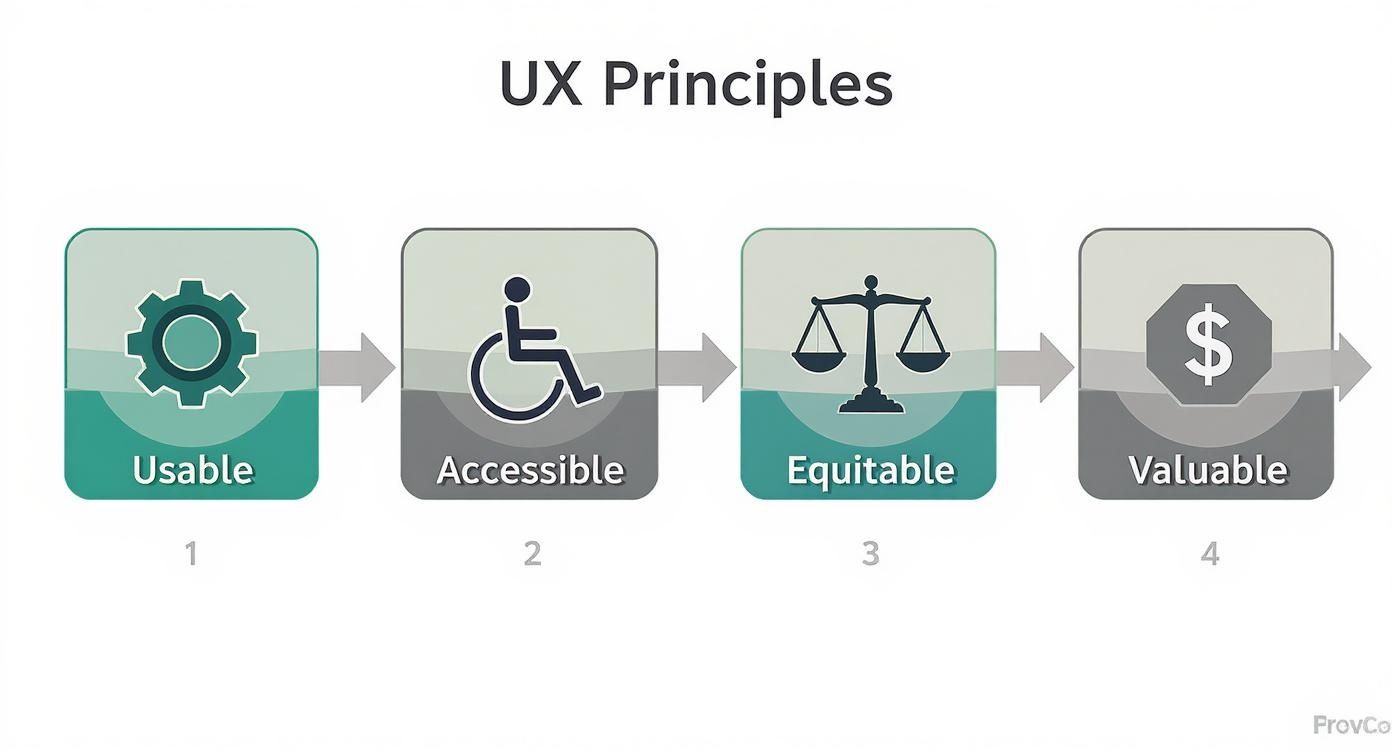
This visual helps you see how each principle builds on the last, leading to a product that doesn’t just work well but also serves its users responsibly and effectively.
Deliver And Test The Final Product
The final phase is Deliver, where the best solution from the Develop phase is refined, tested, and prepped for launch. This stage is all about rigorous usability testing to catch any last-minute issues and make sure the product is ready for the real world. It's where the design finally meets reality.
In our coffee app example, the UX team would run usability tests with their interactive prototype. They'd ask real users to complete tasks like "order a flat white" and watch closely to see where they struggle or get confused. The feedback you get here is gold for making those final, crucial tweaks.
Once the design is polished and validated through testing, it’s handed over to the developers to be built. But the UX designer’s job isn’t done. They stick with the development team to ensure the final product stays true to the design vision. After launch, they monitor user feedback and analytics to spot opportunities for future improvements, kicking off the iterative cycle all over again. Creating a great user experience is a core part of building high-quality websites that drive growth, ensuring users don’t just visit but keep coming back.
The Modern UX Designer's Toolkit
To bring a user's needs to life in a way that’s both functional and genuinely enjoyable, a UX designer needs a specialised set of digital tools. Think of it like a chef’s kitchen—you wouldn’t use a meat cleaver for peeling vegetables. In the same way, a UX designer has specific software for each stage of the design process. These aren’t just for making things look pretty; they’re the essential gear for understanding users, sketching out ideas, and working seamlessly with the whole product team.
A designer’s toolkit naturally follows the project's flow, starting with broad research and narrowing down to detailed, interactive mockups. This ensures every design decision is backed by real user data and thoroughly tested before a developer even thinks about writing a line of code.
Tools for Research and Discovery
The very first step in any UX project is to get inside the user's head. This is all about gathering and making sense of data—both the hard numbers and the human stories. These tools help designers uncover frustrations, test their assumptions, and build a solid, evidence-based foundation for everything that follows.
A few popular platforms in this space include:
- UserTesting: This is a game-changer. It lets you watch videos of real people trying to use your website or app, giving you a front-row seat to every moment they get stuck or confused.
- SurveyMonkey: An absolute essential for creating and sending out surveys. It’s perfect for quickly getting quantitative feedback from a large group of users.
- Optimal Workshop: This platform offers a suite of tools for figuring out your site's structure, including card sorting, which helps you organise content in a way that just makes sense to your users.
This research phase is where the true value of user experience design really clicks into place. The insights you gather here are crucial, especially in the Australian market where digital consumers are savvy and have incredibly high expectations.
A well-researched user experience isn't just a nice-to-have; it's a massive financial driver. In fact, every dollar invested in UX can generate a return of up to $100, which really highlights the direct line between user-centric design and profitability.
The Australian UX scene is a vibrant part of a huge global industry. By 2025, it's projected that Australia will command a 4.96% share of the Asia Pacific UX design services market, which itself makes up 21.3% of all UX spending worldwide. That kind of strong growth shows just how seriously businesses are taking the need to create top-notch digital experiences. Discover more insights about the global UX design market.
Tools for Wireframing and Prototyping
Once the research is solid, it’s time to start giving those ideas some shape. Wireframing and prototyping tools are where concepts go from rough sketches to interactive, high-fidelity mockups that look and feel just like the real thing. You can think of these as the digital sketchpads of the modern designer.
- Figma: This is the undisputed industry leader for collaborative design. It lets entire teams jump into the same file and work in real-time, making it perfect for everything from basic wireframes to pixel-perfect UI and interactive prototypes.
- Sketch: A powerhouse vector design tool that’s incredibly popular with Mac users. It's known for its clean, intuitive interface and a massive ecosystem of plugins.
- Adobe XD: As part of the Adobe Creative Cloud suite, it provides robust tools for designing, prototyping, and sharing user experiences across websites, apps, and more.
Tools for Collaboration and Handoff
At the end of the day, a design is only successful if it can be built properly. This is where collaboration and handoff tools come in. They act as the bridge between designers and developers, making sure the final product is a perfect match for the design vision. They also serve as a central spot for feedback and project management.
Platforms like Miro give teams an infinite digital whiteboard for brainstorming, mapping out user journeys, and gathering feedback in one place. For the final handoff to the developers, features built right into tools like Figma are indispensable. They allow developers to inspect every design element, get the exact measurements, and export assets, making the jump from design to code as smooth as possible. A seamless workflow is vital, just like ensuring your website loads quickly; for more on that, take a look at our comprehensive WP Rocket review to see how caching can seriously speed up your site.
Why Smart Businesses Invest in UX
Let's get straight to the point. Understanding UX design isn’t just about design theory; it's about seeing its direct impact on your bottom line. Good UX isn't some fluffy creative expense—it's a hard-nosed strategic investment that delivers real, measurable returns.
Think of it as the invisible engine driving customer satisfaction, boosting sales, and building a rock-solid brand reputation.
When a website or app just works—when it’s intuitive and solves a real problem—it creates a powerful connection with the user. That positive feeling translates directly into the numbers every business owner cares about.
Boosting Conversions and Customer Loyalty
The most immediate win from a strong UX is on your conversion rates. We’ve all been there: a confusing checkout, a button you can’t find, or a page that takes forever to load. These are points of friction, and they’re absolute conversion killers.
UX design is all about smoothing out these bumps, making it effortless for customers to do what you want them to do.
This is especially critical in Australia’s booming e-commerce market, which is on track to hit AUD 50 billion by the end of 2025. With Aussies now making more frequent but smaller online purchases, a seamless digital experience has become the key to winning them over. Every single interaction counts.
But it goes beyond just one sale. A consistently positive experience builds trust and creates genuine loyalty. When customers know they can rely on your website to work flawlessly every time, why would they go anywhere else? Loyal customers don't just spend more; they become your best brand advocates.
Enhancing Brand Reputation and SEO
Often, your website is the very first handshake a potential customer has with your brand. A professional, user-friendly experience instantly signals that your company is credible and cares about its customers. On the flip side, a clunky or frustrating interface can sour your reputation before you’ve even had a chance to state your case.
This positive user experience also has a massive impact on your search engine rankings. Search engines like Google are obsessed with user experience. They measure signals like how long people stay on your site (dwell time) and whether they leave immediately (bounce rate).
Investing in UX is, therefore, a fundamental part of any effective SEO strategy to increase organic traffic. It's what helps you attract more qualified leads in the first place.
"For every dollar invested in UX, the return can be as high as $100. It’s not an expense; it’s one of the highest-ROI investments a business can make."
Reducing Long-Term Development Costs
This might seem backwards, but spending time and money on UX research and design upfront saves a fortune down the line. The entire UX process is built to spot and solve problems before a single line of code gets written.
Here’s how that works in practice:
- Early Problem Detection: Through user interviews and prototyping, designers can find usability issues when they are still just ideas on a screen. Fixing them at this stage is easy and cheap.
- Reduced Rework: Correcting a problem during the design phase is exponentially cheaper than overhauling a fully built product.
- Clearer Development Roadmap: Developers get a clear, validated blueprint to work from. This cuts out the guesswork and costly back-and-forth communication.
By focusing on building the right thing, the right way, from the very beginning, businesses avoid wasting huge amounts of time and money on features that nobody needed or wanted.
Common Questions About UX Design
As you start to get a real handle on what user experience design is all about, a few practical questions almost always pop up. It’s a field that’s constantly shifting and growing, so it’s natural to wonder about the nitty-gritty of the role, how it fits with other design jobs, and what it actually takes to get started.
Let's break down some of the most frequent questions we hear. These are the queries that help clear the fog for anyone looking to jump in, giving you a better sense of the skills and pathways that lead to a great career.
Do I Need to Know How to Code?
The short answer is no, you don't need to be a coder to be a fantastic UX designer. The heart of a UX role is understanding people—it’s about research, empathy, solving problems, and sketching out intuitive user journeys and wireframes. Your main tool is your brain, not a code editor.
However, having a basic grasp of what’s possible with code, like HTML and CSS, is a massive advantage. It helps you talk to developers in their own language, understand the technical guardrails you’re working within, and design solutions that are actually feasible to build.
Think of it like an architect who understands the properties of concrete and steel. They don’t need to pour the concrete themselves, but that knowledge helps them design a building that won’t fall down.
Knowing the basics of code helps you speak the same language as your development team, which leads to better collaboration and a much more polished final product.
What Is the Difference Between UX and UI Design?
This is probably the most common point of confusion out there. The simplest way to remember it is with a quick analogy: if a product is a house, UX is the architectural blueprint, and UI is the interior decorating.
- User Experience (UX) Design is about the overall journey and feeling someone has when using a product. It’s the logic, the structure, and the flow that makes something useful and easy to navigate. It’s about making sure the house is functional and makes sense.
- User Interface (UI) Design is the visual and interactive part of that experience. It’s the look and feel—the colours, the fonts, the buttons, and the sliders. It’s the paint on the walls, the style of the furniture, and the light fittings you choose.
In short, UX makes a product functional, while UI makes it beautiful and interactive. You absolutely need both working in harmony for a product to truly succeed.
How Can I Start a Career in UX Design?
Getting into UX design is more achievable than you might think. It’s less about having a specific degree and much more about being able to show your skills and your problem-solving process.
Here are a few solid first steps you can take:
- Build a Portfolio: This is your number one asset. Start with a personal project or even offer to help out a local non-profit. The key is to document your entire process—from the initial research to the final designs—to show recruiters how you think.
- Learn the Tools: Get comfortable with the industry-standard software. Right now, that’s Figma. There are countless online tutorials and courses that can get you up to speed pretty quickly.
- Find a Mentor: Connect with experienced UX designers on platforms like LinkedIn. A good mentor can give you invaluable feedback on your portfolio, share career advice, and support you as you find your feet.
Ready to build a digital experience that drives real results? The team at Digital Roo's combines strategic thinking with creative design to help businesses grow. Learn more about our services.

